



AKD1500 Buying Guide
Which AKD1500 Is Right for You?
The AKD1500 family gives you one path from your first test to production silicon. Start with a Raspberry Pi 5 kit or reference design, prototype on a card or board in your own system, then design in the chip. Every product runs the same AKD1500 neuromorphic co-processor and the same MetaTF software, so nothing you build along the way is thrown out.
New to Akida? Read Why AKD1500: Add On-Device AI Without Replacing Your Processor first to understand the AKD1500 chip. This guide helps you pick the right product.
The AKD1500 family
The family runs in two lanes, PCIe and SPI. Each lane goes from a development product to production silicon, and the Raspberry Pi 5 Dev Kit is the starting point.
| Product | Stage | Connects to | Price | Best for |
|---|---|---|---|---|
| AKD1500 Raspberry Pi 5 Dev Kit | Evaluate | Complete system, nothing else needed | $1,295 | Trying Akida out of the box, demos and proof of concept |
| AkidaTag | Start from a working design, SPI lane | Complete system: AKD1500 + Nordic nRF5340, Bluetooth LE, battery | $295 | Building a battery-powered sensing or wearable product from a working design |
| AKD1500 M.2 Card B+M Key | Prototype, PCIe lane | Any host with an M.2 2230 B+M Key slot | $129 | Compact edge devices and single-board computers |
| AKD1500 PCIe Development Card | Prototype, PCIe lane | Any host with a PCIe slot | $149 | Industrial PCs, edge servers and desktops |
| BrainBoard1500 (by Neuromorphyx) | Prototype, SPI lane | An MCU or SoC over SPI/QSPI | $99 | Testing AI next to an MCU before you design a board |
| AKD1500 Edge AI Co-Processor, PCIe | Production, PCIe lane | Arm or x86 application processors | $40, or $200 for 5 | Your own board, built for performance |
| AKD1500 Edge AI Co-Processor, SPI | Production, SPI lane | Low-power MCUs | $20, or $100 for 5 | Your own board, built for the lowest power and cost |
How to choose
Three questions get you to the right product.
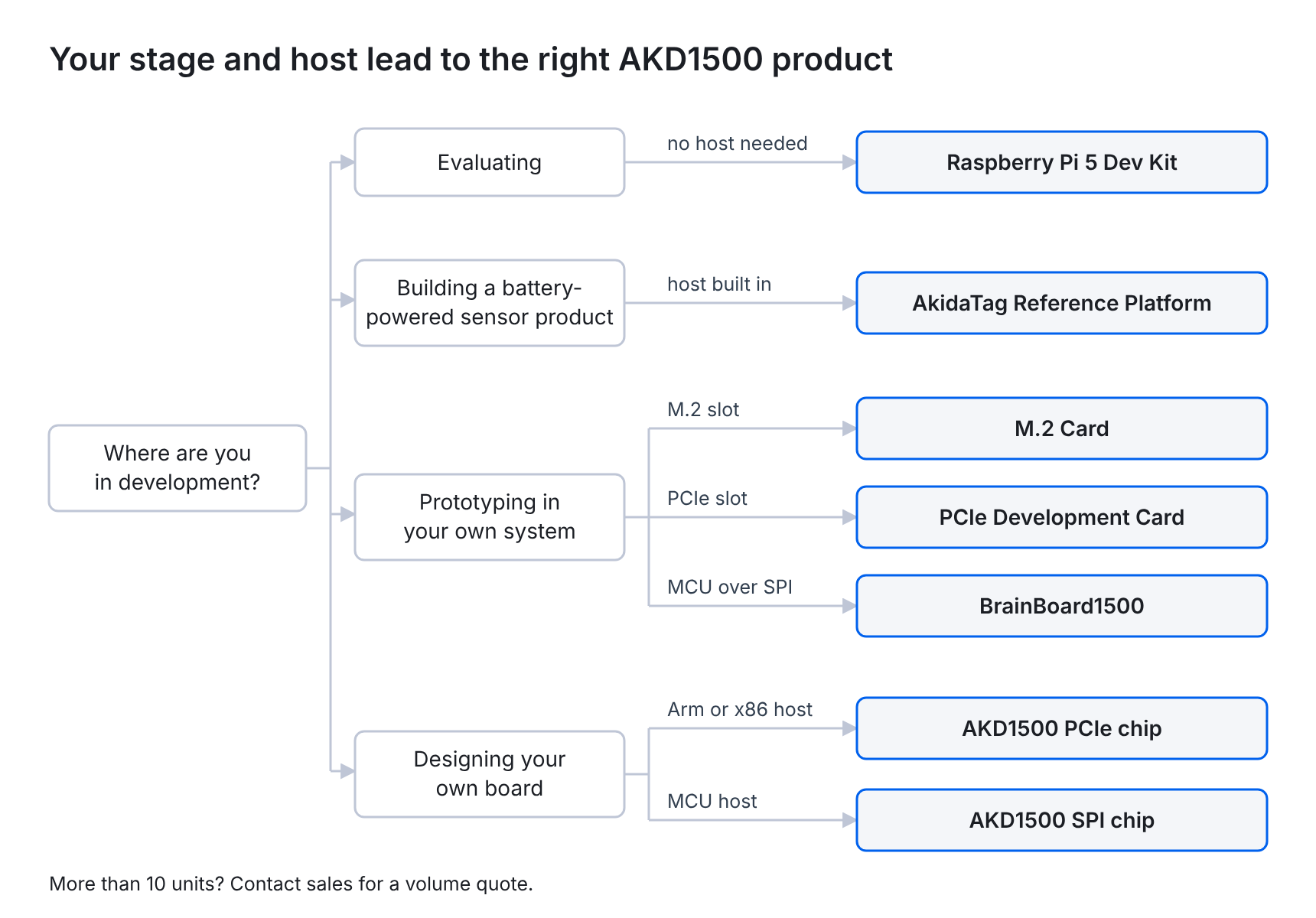
Step 1: Where are you in development?
- Evaluating. You want to see Akida run before committing to anything. Start with the Raspberry Pi 5 Dev Kit.
- Building a battery-powered sensing product. You want a working design to start from, not a blank board. Start with AkidaTag. Run the demos out of the box, load your own model with MetaTF, adapt the open-source firmware, then use the reference design files to build your own product, on your own or with one of our design partners.
- Prototyping in your own system. You already have a host and want to test AI inside it. Choose a card or BrainBoard1500.
- Designing production hardware. You’re laying out your own board. Choose the AKD1500 chip.
Step 2: Start with your host or your budget
If you know your host, let it decide. A single-board computer or compact device with an M.2 slot takes the M.2 Card. An industrial PC, edge server or desktop takes the PCIe Card. An MCU pairs with BrainBoard1500 for prototyping, or the SPI chip for production. An application processor on your own board takes the PCIe chip. No host yet, or building a wireless, battery-powered device? AkidaTag brings its own host, the Nordic nRF5340, so you can start from a working design.
If you’re starting from a budget instead, here’s what each price range gets you:
| Budget | What you get | A good fit if |
|---|---|---|
| Under $50 | AKD1500 chip, PCIe or SPI | You’re designing your own board |
| $100 to $150 | BrainBoard1500, M.2 Card or PCIe Card | You already have a host to plug into |
| About $300 | AkidaTag Reference Platform | You want a working sensing design to build from |
| About $1,300 | Raspberry Pi 5 Dev Kit | You want a complete system that works out of the box |
A chip on its own needs a board designed around it, so if you don’t have one yet, start with a kit, card or BrainBoard1500.
Step 3: How many do you need?
You can buy up to 10 units of any product online, and chips also come in 5-packs for small prototype runs. For more than 10 units, contact sales for a volume quote.
From prototype to production, you only build once
Moving from a prototype to your own board often means reworking the model for new hardware. AKD1500 avoids that. Every kit, card and board in the family is built on the AKD1500 processor, and all of them use the same MetaTF flow, so the model you prove out on a kit or board carries over to the chip you design in. On the PCIe lane, teams typically go from the Raspberry Pi 5 Dev Kit or a card to the PCIe chip. On the SPI lane, they go from BrainBoard1500 to the SPI chip, or start from AkidaTag’s working design and build their own product around the SPI chip.
Bundles and where to buy
If you already know you’ll design AKD1500 into your own hardware, a bundle saves you a second order.
Chip Design-In Kit: the AKD1500 PCIe Development Card plus 5 AKD1500 chips, PCIe or SPI. Prototype your model on the card in a PC or edge server you already have, then build your own board with the chips. The card tests your model, not the SPI interface, so SPI teams who want to test the interface itself should pair their chips with BrainBoard1500.
Most products ship from the BrainChip Store. BrainBoard1500 is the exception: Neuromorphyx sells and ships it, and the store links you there.
| Where | What |
|---|---|
| BrainChip Store | Dev kits, cards, chips and bundles |
| Neuromorphyx | BrainBoard1500, sold and shipped by Neuromorphyx |
| BrainChip Sales | Volume pricing for more than 10 units |
Every product page includes the datasheet, product brief and other downloads.
FAQ
Can I move from a kit or card to the chip without rewriting my model? Yes. Every AKD1500 product uses the same MetaTF flow, so your models carry over.
What’s the difference between the PCIe and SPI chips? The PCIe chip connects to application processors and runs at up to 400 MHz. The SPI chip connects to low-power MCUs and runs at 200 MHz. Both have 32 NPUs, 1 MB of on-chip memory and on-chip learning.
Which hosts do the cards work with? The M.2 and PCIe cards work with Linux hosts, including x86 PCs and Arm boards such as the Raspberry Pi 5. BrainBoard1500 works with MCUs and SoCs over SPI/QSPI.
Can I prototype an SPI design on the PCIe card? You can test your model on the card, but not the SPI interface. To test SPI integration with your MCU, use BrainBoard1500. To see a complete SPI design already working, look at AkidaTag.
What comes with the Raspberry Pi 5 Dev Kit? A Raspberry Pi 5 with the AKD1500 M.2 Card pre-installed, a pre-configured 32 GB microSD card with Akida demos and MetaTF, and a USB-C power supply.
Who sells BrainBoard1500? BrainBoard1500 is designed, sold and shipped by our partner Neuromorphyx. You’ll find it in the BrainChip Store, with a link to buy from Neuromorphyx.
What if I need more than 10 units? Contact BrainChip Sales for a volume quote.
Can I train models on my own data? Yes. MetaTF works with models from TensorFlow/Keras, PyTorch, ONNX and integrates with Edge Impulse, and AKD1500 can also learn new classes on the device after deployment.
What’s the difference between AkidaTag and BrainBoard1500? Both use AKD1500 on the SPI lane, but they start you in different places.
- BrainBoard1500 ($99, by Neuromorphyx) is an AKD1500 board that you attach to your own MCU board over SPI/QSPI. Choose it if you already have a host and want to test AI next to it before you design a board.
- AkidaTag ($295) is a complete, battery-powered device with its own host (a Nordic nRF5340 with Bluetooth LE), sensors and a companion app. Choose it if you want a working design to build your own wearable or sensor product from.
Either way, the models you build in MetaTF carry over to the AKD1500 SPI chip.
Ready to build?
Whichever product you start with, you’re working on the same silicon and the same software you’ll ship. Pick the one that matches where you are today, and move up when you’re ready.
Shop the AKD1500 family or talk to our sales team about your project.




